Limit runs at once
Cap how many runs of a workflow go at once, and choose what happens to the rest.
By default, runs go at once, as many as your account allows. Set a limit when the app you call can’t keep up, or when runs must happen one after another.
Set the limit
- In the builder’s left rail, open Settings.
- Set Concurrency limit, such as
1. 0 means no limit of its own. - Under When it is at its limit, choose Wait in line or Refuse.
- Press Publish. Settings apply when you publish.
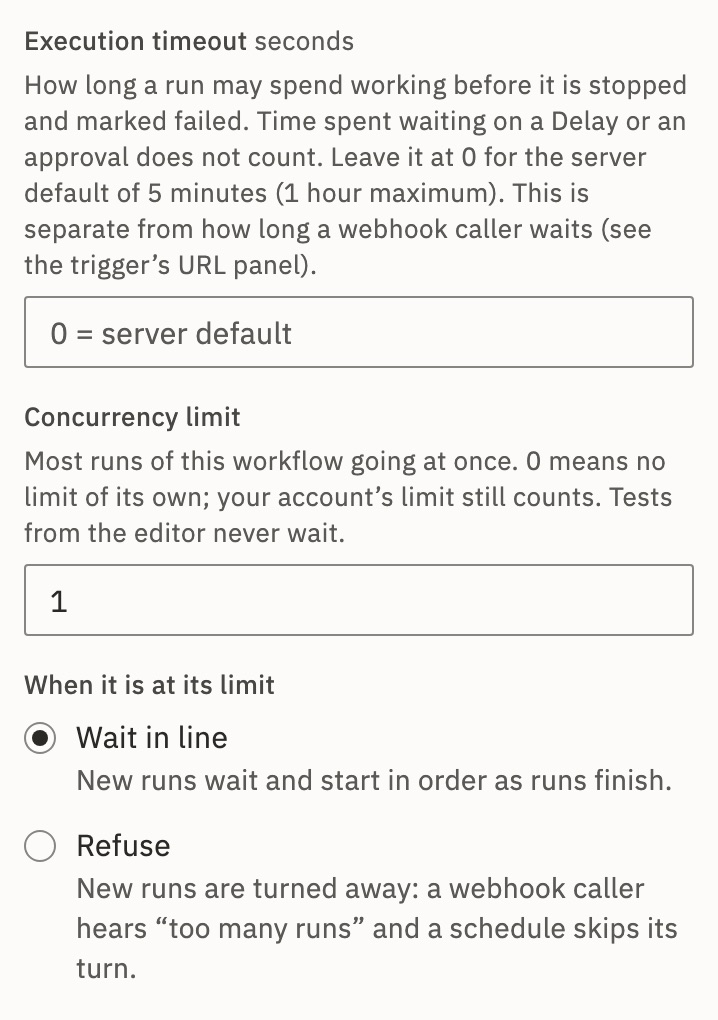
Wait in line, or refuse
| A new run comes from | Wait in line (the default) | Refuse |
|---|---|---|
| A webhook | It waits and starts in order. The caller waits up to 30 seconds, then gets 202 with the run’s id. | 429 CONCURRENCY_LIMIT |
| The API | It waits and starts in order. The call answers 202 with the run at once. | 429 CONCURRENCY_LIMIT |
| A form | Accepted, and waits. | The form says This form is busy. |
| A schedule | It skips its turn while a run of it still waits. | It skips its turn. |
| An app trigger that checks | A run for each new item, waiting in line. | It keeps the items for its next check. |
Tests from the editor skip the workflow’s limit, but count toward How many may wait below.
See the line
In Runs, a waiting run shows Queued and its place, such as 1st in line · this workflow runs 1 at once. Above the list, Show the line lists what waits, and Cancel 2 queued… takes them out. A cancelled run never runs.
Unpublishing doesn’t empty the line. It asks first, and the waiting runs still run, on the version they started with, unless you tick Cancel them too.
The rules
- Order
- Runs of one workflow start strictly in order. Across organizations, the one using least of its limit goes first.
- Your account’s limit
- An organization can have a limit over all its workflows. A run it holds says the account runs 5 at once.
- Who sets it
- On Cloud, GoRunner. Self-hosted: platform admins, in Platform › Settings › General. Embed: the product you use.
- Held runs
- A run held for an approval keeps its workflow’s place, but frees the account’s.
- Error workflows
- A run started by another workflow’s failure or end starts at once.
- How many may wait
- 1,000 runs of one workflow and 10,000 of one organization. Past that, new runs are refused with
429RUNS_WAITING_LIMIT, tests included. A refused test event says The test event arrived but did not run.
A self-hosted installation can change the last two numbers with RUNS_WAITING_PER_WORKFLOW and RUNS_WAITING_PER_ORG.
Check it worked
With the workflow live and at its limit, start one more run. In Runs, it shows Queued with its place in line.
For developers
The settings are settings.concurrencyLimit and settings.whenFull (wait or refuse). A waiting run reads waiting, with waitingFor (workflow or organization), waitingLimit and linePosition. Count a workflow’s waiting runs and Cancel waiting runs work on one workflow’s line.
Related
- RunsWhat Queued and the other states mean · 4 min
- Run states and limitsEvery state and limit, with its API word
- Start from a webhookWhat a caller gets back · 5 min
Checked against 12d85b3b