A connection stopped working
Connections shows a word next to the connection. Find it below.
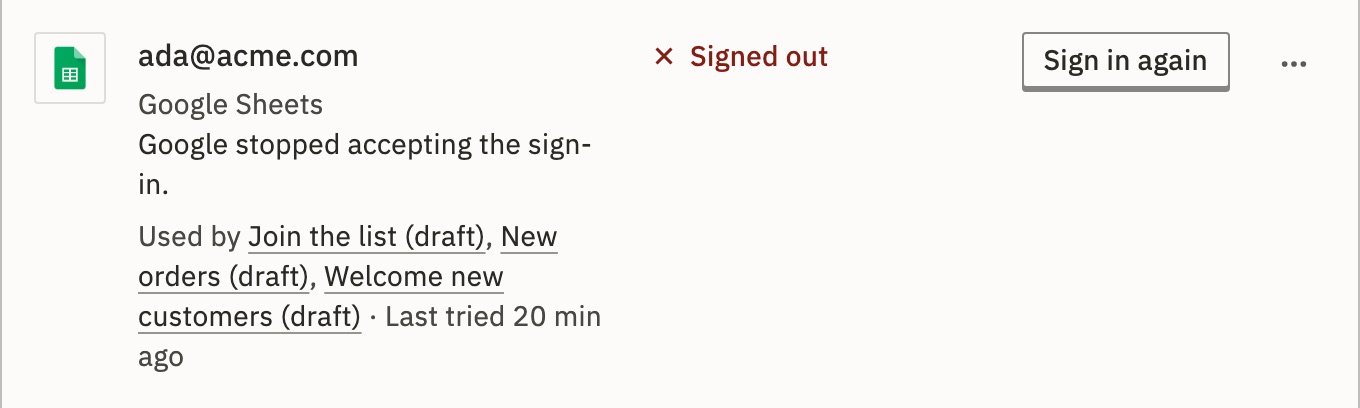
A working connection shows no word. The row’s key is the fix. When a live workflow uses it, it is also under Needs you.
- Not workingA password, key or server was refused
- Signed outThe sign-in ended
- Not signed inThe sign-in never finished
- ExpiringThe sign-in ends within 7 days
- Never testedNothing has checked it yet
- Not availableThis installation doesn’t include the app
Not working
A test or a run was refused with what you typed. The row says why, such as The database refused the password or SeaTable refused the API token.
Fix- Press the row’s key. It names what to change: Change password…, Change API token…, Change connection string… or Change server….
- Paste the new value and press Test and save.
- Open the failed runs and press Run again.
What if Google’s mail server refused the password?
For email by SMTP or IMAP, Google asks for an app password, not the account’s own. Make one in your Google account and paste it.
Signed out
The service stopped accepting the sign-in, or it ended and can’t renew itself. A pasted Google access token lasts about an hour.
Fix- Press Sign in again and finish the sign-in.
- Open the failed runs and press Run again.
Not signed in
The sign-in was started and never finished, for example when the window was closed.
Fix- Press Sign in and finish it.
Expiring
The sign-in ends within 7 days and can’t renew itself. The row says when.
Fix- Press Sign in again before then.
Never tested
Nothing has checked it yet.
Fix- Press Test. It asks the service whether the connection works, and changes nothing there.
Not available
This installation doesn’t include the app, so nothing can run or test the connection.
Fix- Use an app that is included, or the HTTP Request app with the service’s API. See When an app isn’t here.
It works, but says a service refused access
The connection is fine, but its account may not reach something a run asked for. The row says where, such as Google Sheets refused access in a run of “Weekly report”. Share that file or folder with the account.
In Embed: A connection that says Managed by is your provider’s. There is no key to fix it here: ask them.
Still stuck?
Write to GoRunner support. Send the connection’s name, its app, and what the row says.