Audit log
Who did what in your organization, and when.
Not in the Embed: there is no audit log page there. Your provider’s platform admins keep the record.
You need
- An owner or admin
- Of the organization.
Every change people make leaves a row, sign-ins included. Opening a workflow or a run doesn’t.
Open it
Open the menu under your name, then Settings. Under Organization, open Audit log. The newest events come first.
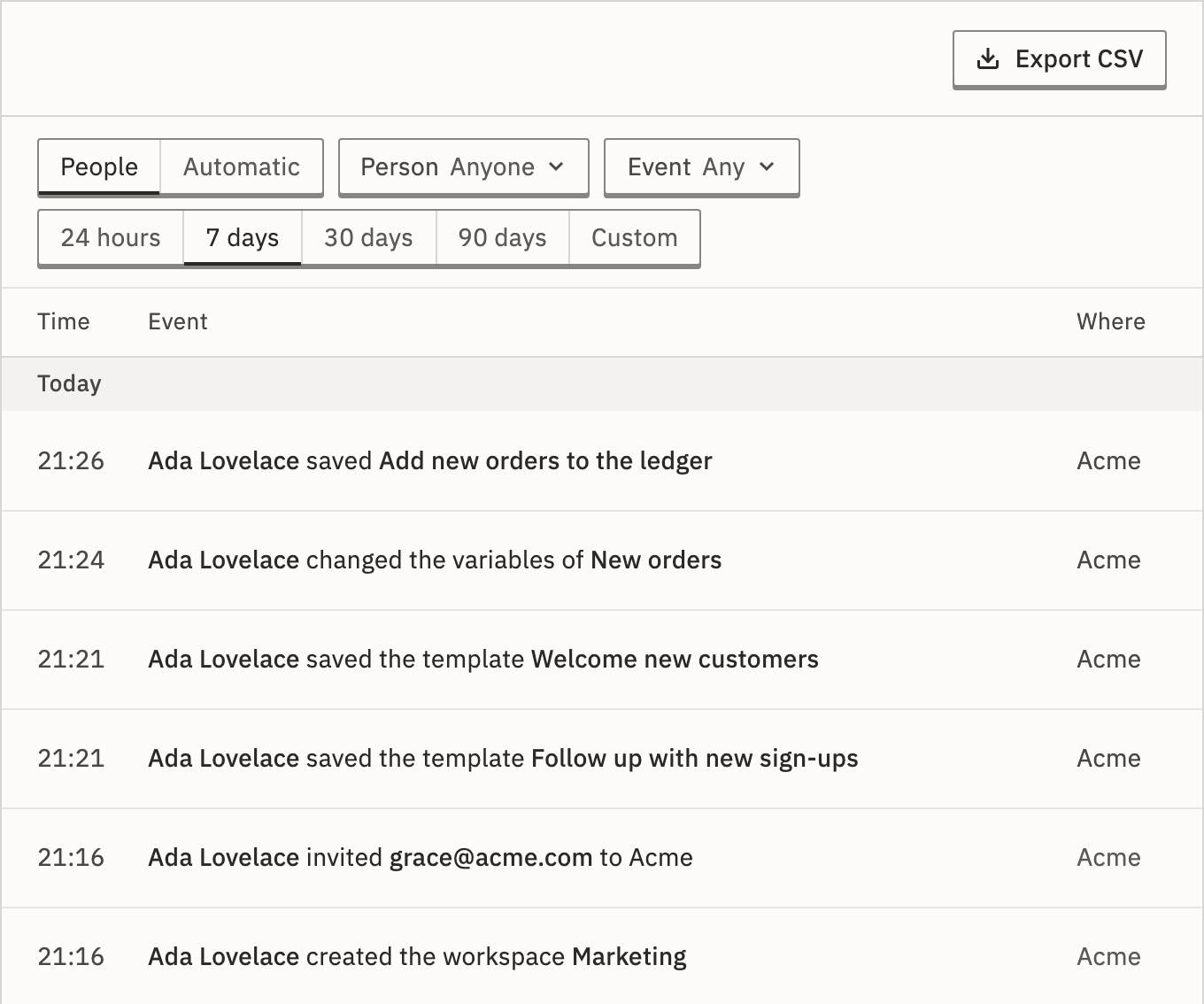
- People
- What people did in the organization, including sign-ins. One row each.
- Automatic
- Connection use by runs and people, and what GoRunner did on its own, as totals by the hour, up to 92 days at a time. It has no Person filter.
Read a row
Each row is a sentence with the person first, such as “Dana Whitfield removed Tom Becker from Acme”. Select it to see the time in your zone and in UTC, the address it came from, and the event’s name, such as member.remove.
Who did it can be a person, an API token, Keel or GoRunner itself. More by and their name lists the rest of theirs; Copy link shares the row. A changed setting is named, never its value.
Changes GoRunner support made while helping you are marked Staff visit.
Changes your installation’s platform admins made inside the organization are marked Admin visit.
Whose sign-ins do I see?
Your members’ sign-ins, sign-outs, two-factor and password changes, and refused sign-ins to their accounts, for the time they were members. Someone who left keeps their rows from that time. You never see what they did elsewhere.
Find something
- Person
- Anyone, someone in the organization, someone No longer in it, or staff visits.
- Event
- A group, such as Members, then one event in it.
- Period
- 24 hours, 7 days (the default), 30 days, 90 days, or two dates.
The filters are part of the page’s address, so you can send a filtered view to someone.
Why is one save a single row?
The editor saves every few seconds. The first save is a row at once; the next ones within 10 minutes are counted, and the last one is written with the count. Refused sign-ins from one address are written at most five a minute; the rest are counted the same way. A publish, a delete or a role change is always its own row.
Export it
Press Export CSV. You get the rows your filters select, newest first, up to 100,000. For more, export one period at a time. The export is itself a row in the log.
It needs no license. A license’s Audit export is for Platform › Audit log.
The CSV’s columns
time, action, label, actor, actor_type, target_type, target_id, workspace_id, ip, metadata,
summary, actor_name, target_name, workspace_name
summary is the row’s sentence. metadata holds its details as JSON. A cell that starts with =, +, - or @ gets a leading ', so a spreadsheet never runs it.
How long it is kept
If rows are deleted after a time, the page says how long, such as Events are kept for 90 days.
On GoRunner Cloud, Automatic says Connection use by runs is kept for 90 days, and each connection’s latest use for longer. That is the use GoRunner records by itself, for runs, schedules and polls. Totals and exports older than that no longer count it. What people do, their own connection use included, and security events are kept.
On your installation they are kept forever, unless AUDIT_RETENTION_DAYS is set. Then older rows are deleted every hour. See Settings (.env).
AUDIT_CREDENTIAL_USE_RETENTION_DAYS is narrower. It deletes only the connection use GoRunner records by itself, and each connection keeps its latest use. See Settings (.env).
To keep it elsewhere, export it, or send it as it happens with event streaming.
Related
- EventsEvery event the log records, by group
- Event streamingSend events to your own tools · 6 min
- Invite people and set rolesMembers and People · 4 min
Checked against 12d85b3b