Event streaming
Send your organization’s audit and run events to your own tools as they happen.
Not in the Embed: there is no event streaming page there.
Tell your monitoring when a production run fails, or send every sign-in and role change to your security team. Streaming sends what happened, never the data a workflow handled.
You need
- An owner or admin
- Of the organization, signed in as yourself. An API token or an AI app can’t add or change a destination.
Add a destination
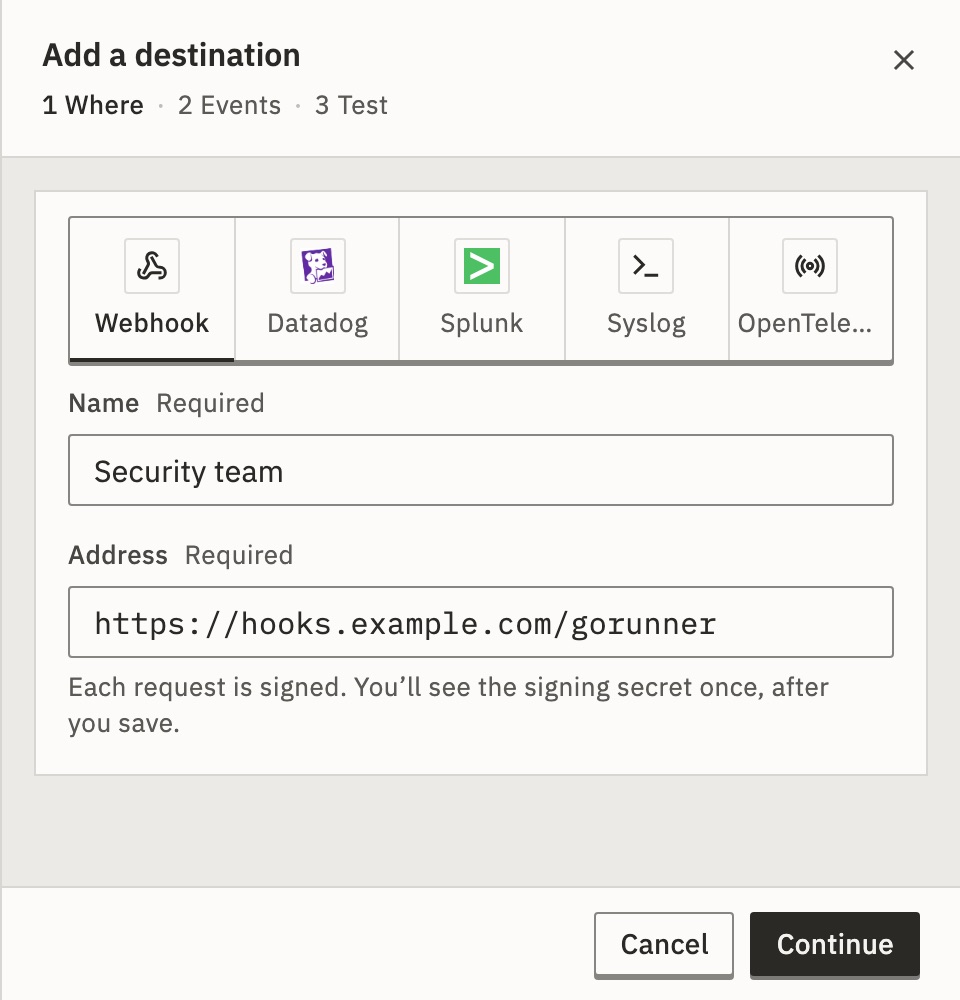
- Open Settings. Under Organization, open Event streaming and press Add destination.
- Where: choose the Kind, give it a Name your team will recognize, and fill in its settings. Press Continue.
- Events: tick whole groups, such as Runs, or single events. Press Continue.
- Test: press Send test event. A sample marked
"test": truegoes to your tool now. A new webhook’s test is signed with a one-time secret, so your signature check refuses that one sample. - Press Save destination. For a webhook, copy the signing secret: you won’t see it again.
You should see the test says Delivered, with your tool’s answer and the time it took.
You can save even when the test says Not delivered. Failed sends are retried for up to 36 hours.
What does ticking a whole group take?
Every event in it, including the High volume ones, such as a stored key being used. You can untick those. A group ticked whole also takes events added to it later.
See Events.
Kinds and their settings
Events go only to public addresses, never to this installation’s own machine or a private network. Keys, tokens and headers are stored encrypted and never shown again. If you change where events go, type them again. A destination’s kind can’t change: add a new one instead.
Your own server, at any HTTPS address.
- Address
- Any
https://address. Each request is aPOSTof the event as JSON, signed.
Answer with any 2xx within 15 seconds. A redirect counts as a failed try: give the final address. Answering 410 Gone stops the destination. See Check a webhook is genuine.
Logs, on any Datadog site.
- Site
- Where your account lives: US1, US3, US5, EU, AP1 or US1-FED.
- API key
- A Datadog API key, from Organization settings › API keys in Datadog. Only its last four characters are shown after you save.
- Service
gorunnerunless you change it.- Tags
- Optional,
key:valueseparated by commas, up to 50.
Each event is one log with ddsource:gorunner, its fields under gorunner. source:gorunner @gorunner.type:run.failed finds every failed run.
Where each site sends
| Site | Sent to |
|---|---|
| US1 | http-intake. |
| US3 | http-intake. |
| US5 | http-intake. |
| EU | http-intake. |
| AP1 | http-intake. |
| US1-FED | http-intake. |
An HTTP Event Collector.
- Collector address
- Such as
https://splunk.example.com:8088./services/collector/eventis added if you leave it out. - Token
- The collector’s token, sent as
Authorization: Splunk <token>. - Index
- Optional. Empty uses the token’s default index.
- Source type
gorunner:eventunless you change it.
Each event’s JSON goes as event, with source gorunner.
Any syslog server, encrypted.
- Host and port
- A public address, such as
logs.example.com:6514. Without a port: 6514 fortls, 514 fortcp. - Transport
tls, the default, with the server’s certificate checked.tcponly where a platform admin allows private networks.- Facility
local0unless you change it. Alsouser,daemon,auth,syslog,authpriv,auditandlocal1tolocal7.
Each event is one RFC 5424 message, app name gorunner, message id the event’s type. A try counts as delivered once it is written. Messages are framed by octet counting (RFC 5425 over TLS, RFC 6587 over TCP): set your collector to accept that.
Any tool that takes OTLP logs.
- Endpoint
- The OTLP over HTTP address.
/v1/logsis added for you, or give the full address ending in it. - Headers
- One per line as
Name=value, up to 20, usually the tool’s API key. Each value is one line, up to 4,096 characters.
Each event is a log record from service.name gorunner, scope gorunner.events, with gorunner.event.type, gorunner.event.id, gorunner.org.id and, when they apply, gorunner.workflow.id and gorunner.run.id.
Failed runs and expired connections arrive as warnings, everything else as information.
Is it working?
Each destination says its state. Its page adds the last 24 hours: delivered, failed and waiting.
- Delivering
- Events reach your tool.
- Failing
- Your tool refused or didn’t answer, with its last answer. Sends are retried for up to 36 hours.
- Paused
- Nothing is sent. Resume within 36 hours and the waiting events go out in order. Older ones end as Failed; Resend failed since… sends them.
- Stopped
- Your server answered
410 Gone. Resume it once it listens again. - Ready
- Nothing has happened yet. Press Send test to see one arrive.
- Not sending
- Streaming is off on this installation.
A destination’s ⋯ menu:
- Send test…
- Sends a sample now, signed with the real secret.
- Edit…
- Change its name, settings and events. Not its kind.
- Pause
- Stops sending until you press Resume.
- Delete…
- Nothing more is sent, and its delivery log goes with it. The audit log keeps its own record.
Streaming needs no license. If EVENT_STREAMING_ENABLED=false is set, the page says Event streaming is off. Your destinations are kept. Which addresses events may reach follows the installation’s outbound rules: see Settings (.env) and Outbound access.
Deliveries
A destination’s page lists every delivery under All, Failed, Waiting and Delivered. Open one to see what was sent and each try, with the start of your tool’s answer.
- Resend
- Sends one delivery again, with the same event id.
- Resend failed since…
- In the ⋯ menu: sends again everything that failed after a time, up to 1,000 at once.
A failed try is tried 7 more times over about 28 hours: after 5 seconds, 5 minutes, 30 minutes, 2 hours, 5 hours, 10 hours and 10 hours. Then it is Failed. Deliveries are kept for 30 days.
Can an event arrive twice, or out of order?
An event can arrive more than once, after a retry or a resend, always with the same id. A retry can also arrive after a newer event. Skip an id you have handled, and order by timestamp.
How soon do events arrive?
Run results within about 15 seconds. Audit events within about 45. After an outage, the last 24 hours of audit events are sent, nothing older.
Related
- EventsWhat each event holds, the signature check and the limits
- Audit logRead and export the same events · 3 min
Checked against 12d85b3b