Invite people and set roles
Add people to your organization and its workspaces, and choose what each may do.
Not in the Embed: your provider adds people to your account.
You need
- An owner or admin
- Of the organization, to invite people to it.
- A workspace admin
- To add people to that workspace.
Invite people to the organization
- Open Settings. Under Organization, open People and press Invite people.
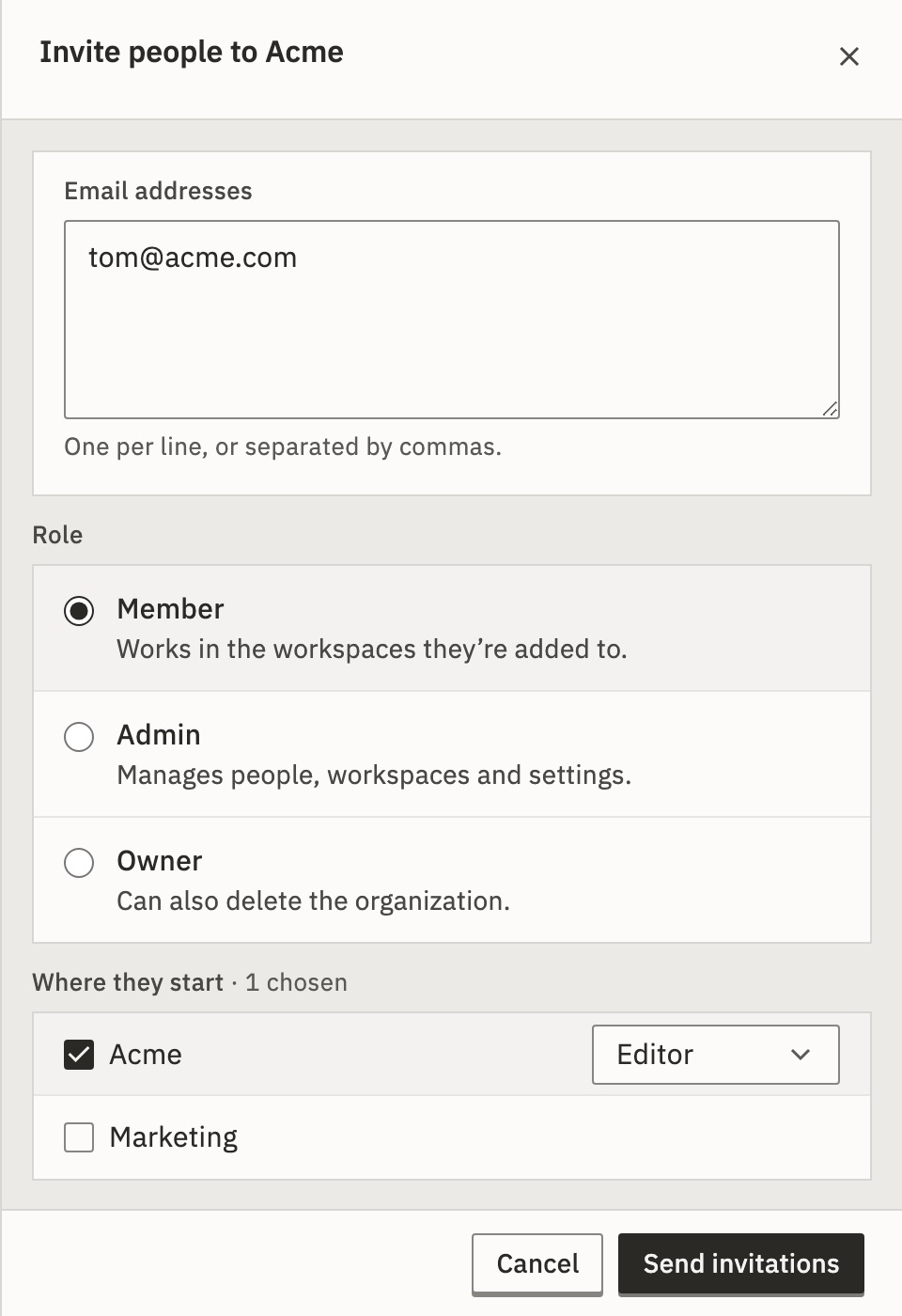
- Type the Email addresses, one per line or separated by commas.
- Choose a Role: Member, Admin or, if you are an owner, Owner.
- For a member, under Where they start, tick the workspaces and a role in each.
- Press Send invitations.
You should see each address says Emailed. The link is below too., with the link and Copy.
A link works once, for 7 days, and you see it only now. If it is lost, press Revoke under Invited and invite them again.
On an installation without email, each address says Created. Send the link yourself. See Sign-in without email.
What if an invitation expired?
Under Invited it says Expired. Press Send a new link: it invites the same address again, with the same role and workspaces. The new link shows once, as before.
What if there are no seats left?
When the license limits seats, the page says Seats 4 of 5, with your numbers. An invitation holds a seat until it is accepted or revoked. Revoke one, or remove someone, to free a seat.
Add someone to a workspace
Open Settings › Workspace › Members and press Add people. Then:
- From the organization
- Pick people already in it and one Role here for them all.
- By email
- Owners and admins of the organization only: an invitation to this workspace.
Owners and admins of the organization can open every workspace anyway.
Roles
A person has one role in the organization, and one in each workspace they work in. See Workspaces and roles.
Change a role or remove someone
- A role
- Choose another in the person’s row. It applies at once, with Undo. Making someone an owner asks first. A lower workspace role ends their API tokens that hold a permission it lacks.
- From a workspace
- In Members, open the row’s ⋯ menu, choose Remove from and the workspace’s name, then Remove. They stay in the organization and can be added back. Their API tokens for that workspace end.
- From the organization
- In People, open the row’s ⋯ menu and choose Remove from and the organization’s name. Their API tokens there end, and so do the invitations they sent that are still open.
On an installation where people sign in with a password, the row’s ⋯ menu also has Copy reset link….
To leave, hand over or delete an organization or a workspace, see Workspaces and roles.
To let your identity provider add and remove people, see Set up single sign-on and Provision people with SCIM.
Related
- Workspaces and rolesHow organizations and workspaces fit · 4 min
- Turn on two-factor sign-inA code from your phone at each sign-in · 3 min
- Audit logWho invited whom, and when · 3 min
Checked against 12d85b3b