The assistant
Your customers ask the assistant to build and fix workflows. It runs on one AI key you set for all of them.
This page needs your own installation with an Embed license.
It is Keel, under your name for it: Branding’s Assistant name replaces Keel everywhere, even in what it calls itself.
Set it up
- Open Platform › What customers get and press the Keel for customers row.
- Under The AI key and model, choose the Provider, Anthropic or OpenAI, and paste its API key.
- Choose the Model and its Reasoning, and the limits below.
- Save with your two-factor code.
You should see the key is checked once. “Works with tool calling” means customers have the assistant.
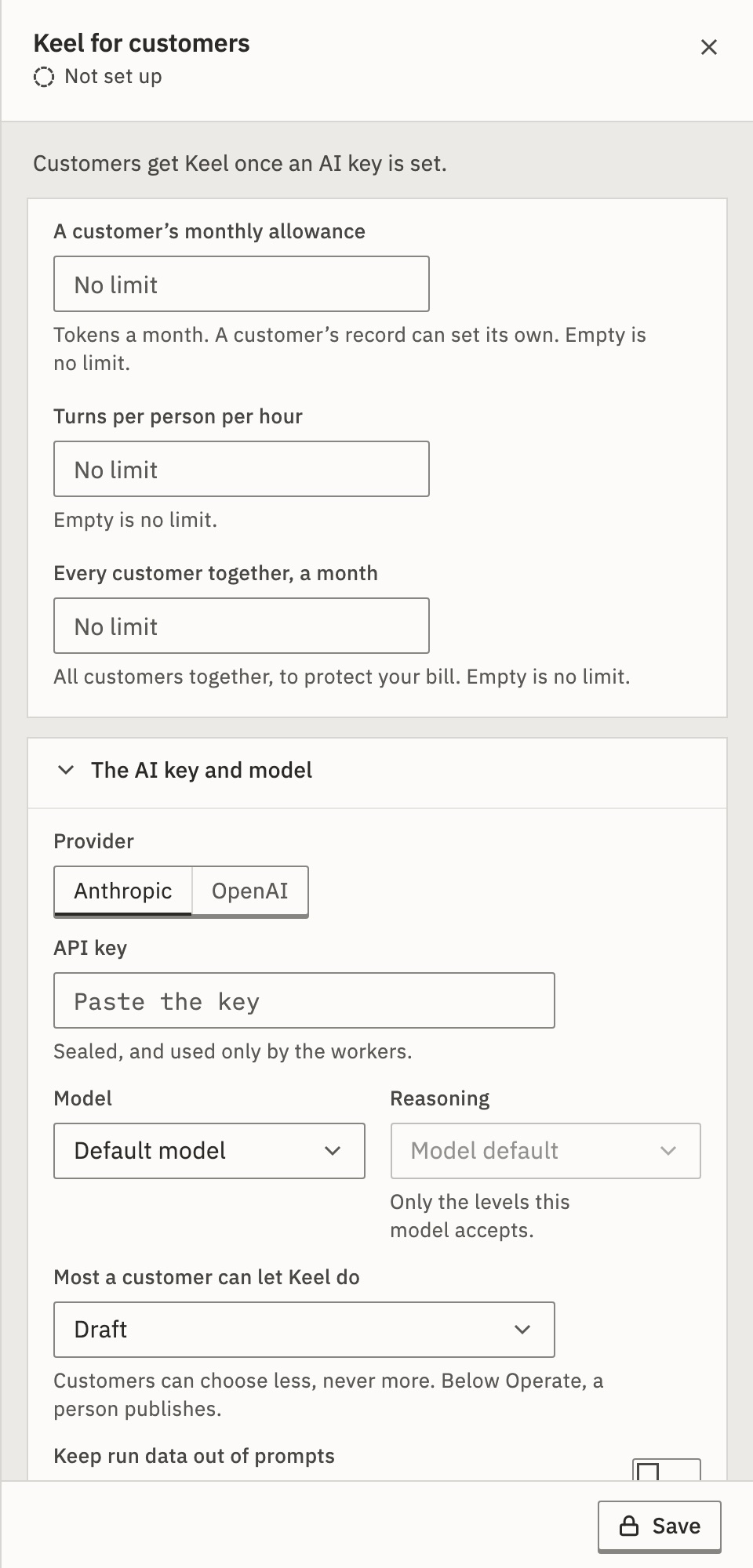
- API key
- Sealed, and used only by the workers. Once saved, only its last four characters show.
- Model, Reasoning
- Customers can’t choose either. Reasoning offers only the levels the model accepts.
- Most a customer can let Keel do
- Ask, Draft, Operate or Full. Draft unless you change it. Customers can choose less, never more. Below Operate, a person publishes.
- A customer’s monthly allowance
- Tokens a month for each customer account. Empty is no limit. A customer’s record can set its own.
- Turns per person per hour
- Empty is no limit.
- Every customer together, a month
- All customers together, to protect your bill. Empty is no limit.
- Keep run data out of prompts
- The assistant sees the shape of a run’s data, not the values.
- Your own organizations
- Your staff’s organizations with no key of their own use this one too. Off unless you tick it.
When customers have it
The assistant switch is on by default, but customers get the assistant only while its key’s check passes. Until then the switch says “Off until the assistant below works”. You can switch it off for everyone, one account or one sign-in.
| The check says | Do this |
|---|---|
| Works with tool calling | Nothing. Customers have it. |
| Anthropic refused the key: … | Paste a working key, or choose a model the key may use. |
| No worker is free to check the key. Try again in a minute. | Press Check again. |
An organization with an AI key of its own keeps using it. That is how one large customer brings its own key: your staff set it during a visit to their organization.
What it may do
It acts with the person’s own role and switches, through the same checks as a click. A viewer’s assistant can’t build, and an app that is switched off isn’t offered. It never reaches further than the person could.
When a limit is reached
Limits run by calendar month, in UTC. Each is checked before a turn starts and before each step of its work, so a turn that reaches one ends there, keeping what it did. A turn the person stops still counts what it used.
The person is told the assistant is unavailable until the limit resets. There is no warning before, so customers never see how close they are.
Your staff see each customer’s use on their record and in the Usage view of Platform › Organizations. Both count only the tokens your key paid for. Set one account’s allowance from your server with assistant.monthlyTokens on Create or update an account.
What if I remove the key?
Remove the key… takes the assistant away: “Customers lose Keel until a key is set again.” Organizations with a key of their own keep using it.
Related
- What Keel can doThe assistant, as your customers use it · 4 min
- Usage, suspension and deletionEach customer’s runs and assistant tokens
- SwitchesTurn the assistant off for one account or sign-in
Checked against 12d85b3b