Notifications
Your server hears what happens in your customers’ accounts, from a failed run to a new connection, as signed requests.
This page needs your own installation with an Embed license.
Use them to email a customer, open a ticket, or count finished runs as they happen. This is everything your server can hear about your customers. Inside your page, the SDK’s events say what happens in the open embed. Event streaming isn’t for customer accounts.
Add a destination
- Open Platform › Notifications and press Add a destination….
- Enter the Address your server listens on, starting with
https://, and a Description. - Under Events to send, tick what it should hear. None is ticked for you.
- Press Add the destination and enter your two-factor code.
- Press Copy the signing secret. You won’t see it again. The dialog also shows code that checks each request.
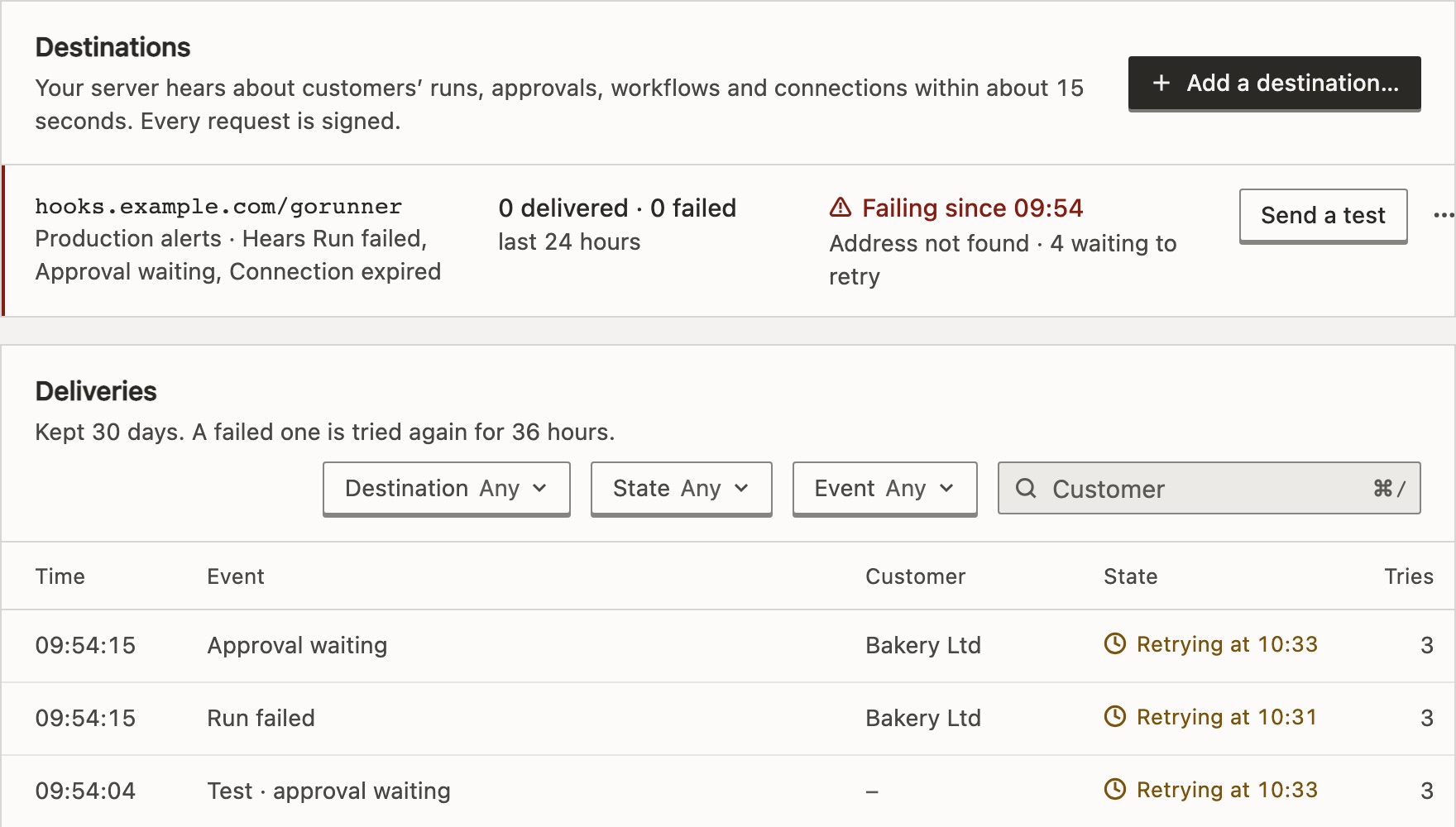
Each row says what it hears and how its last 24 hours went, with Send a test. Its menu has Change…, Rotate secret…, Replay failed since…, Turn off and Delete…. An installation has up to 20 destinations.
What if my server is on a private network?
A destination must be a public address. One on the installation’s own machine or private network works only when its operator allows it with OUTBOUND_ALLOW_PRIVATE.
The events
run.failed- A production run of a customer’s workflow failed. A sub-flow’s failure is part of the run that called it.
run.completed- A production run worked. Marked High volume: there can be many a day.
approval.waiting- A run is waiting for someone to approve or reject.
workflow.created- Made new, copied, imported, from a template, by the assistant or by your server.
workflow.changed- Saved, a version brought back, or its variables, tags or folder changed. At most one every 5 minutes for each workflow.
workflow.published- Switched on, or a new version published.
workflow.unpublished- Switched off.
workflow.deleted- Gone from the customer’s account.
connection.created- Added, by a person or your server.
connection.changed- Renamed, or signed in again.
connection.removed- Removed.
connection.expired- The service stopped accepting it. It needs signing in again.
A destination hears only what happens after it was added, and only in your customers’ accounts. Nothing new is noticed in an account while it is suspended or deleted. While the license lacks Embed, nothing is sent; deliveries still within 36 hours go out when it returns.
Do I get new event types after an update?
No. An update never ticks an event for you. All but run.failed, approval.waiting and connection.expired arrived in v2026.10.4. The dialog marks the newer ones New; tick each on the destinations that should hear it. A destination hears it from then on, never what happened before.
The request
A POST with a JSON body in the Standard Webhooks shape. No header carries GoRunner’s name.
{
  "id": "6f1c2a90-4b1e-4c55-9b7e-2e0d61f0a2c4",
  "type": "connection.expired",
  "timestamp": "2026-10-01T10:12:40Z",
  "data": {
    "test": false,
    "account": { "id": "acct-bakery", "name": "Bakery Ltd" },
    "workspace": { "id": null },
    "user": { "id": "ada-123" },
    "connection": {
      "id": "c0d1e2f3-0000-4000-8000-000000000001",
      "name": "Invoices sheet",
      "piece": { "id": "googlesheets", "name": "Google Sheets" },
      "managed": false,
      "externalId": null,
      "expiredAt": "2026-10-01T10:12:40Z"
    },
    "route": "/connections?connection=c0d1e2f3-0000-4000-8000-000000000001"
  }
}
What each event carries
- Every event
accountandusercarry your ids.workspaceisnullfor the default one, anduserisnullwhen your server or your staff did it.testistrueonly on a sample.routeis the page to open: pass{ path: route }tomount()ornavigate().run.failed,run.completedworkflowandrun:id,status,trigger,startedAt,firstStartedAt,finishedAt,durationMs.statusisworkedonrun.completed.startedAtis when the run was accepted,firstStartedAtwhen a worker first started it (nullon a run from v2026.10.5 or earlier), anddurationMscounts from it. A failed run addserror:message, cut at 2,000 bytes, andstep.approval.waitingworkflow,runandapproval:step,title,message,expiresAt, the title and message cut at 1,000 bytes. It never carries the Approve and Reject links.workflow.*workflow:id,name,status(draft,liveorpaused;nullonce deleted),updatedAt,version.workflow.changedaddschanges(saved,version_restored,variables,tags,folder), names the last person who made one, and arrives 30 seconds to 5½ minutes after the change.connection.*connection:id,name,piece, andmanagedandexternalIdfor one your server manages.- Who and when
- The
workflow.*events, andconnection.created,.changedand.removed, carryby: { kind, user }(person,partner,assistant,staff,tokenorsystem) andoccurredAt.
An event never carries a workflow’s definition or a credential, but it does carry your customers’ names.
Check a request is genuine
Each request has three headers: webhook-id, the same on every try; webhook-timestamp, in Unix seconds; and webhook-signature, v1, then an HMAC-SHA256 of id.timestamp.body with your signing secret (whsec_…).
import { Webhook } from "standardwebhooks"

const wh = new Webhook(process.env.GORUNNER_SIGNING_SECRET)
// Throws if the signature is wrong, or the timestamp is
// more than 5 minutes from your clock. rawBody: the body
// exactly as it arrived, before any parsing.
const event = wh.verify(rawBody, {
  "webhook-id": req.headers["webhook-id"],
  "webhook-timestamp": req.headers["webhook-timestamp"],
  "webhook-signature": req.headers["webhook-signature"],
})
Rotate secret… gives a new secret, and the old one keeps working for 24 hours. Meanwhile each request carries both signatures, so a checker with either secret passes.
Delivery and retries
- First try
- Within about 15 seconds of the event.
- Delivered
- Any answer from 200 to 299, within 15 seconds.
- Retried
- Anything else, a redirect included, 7 more times over about 28 hours: after 5 seconds, 5 minutes, 30 minutes, 2 hours, 5 hours, 10 hours and 10 hours. Then it is Failed.
- 410 Gone
- Turns the destination off at once. Nothing is sent to it, not even a test, until you turn it on. What failed meanwhile isn’t resent.
- Order
- Not guaranteed. Skip an event whose
webhook-idyou already handled, and drop one older than what you have, byoccurredAtorworkflow.updatedAt.
Deliveries keeps every delivery for 30 days, with each try and the first 512 bytes of its answer. Open one to see what was sent, and press Replay to send it again. Replay failed since… resends up to 1,000, never one already sent again. Deleting an account deletes its deliveries. Staff read a customer’s full audit trail on Platform › Audit log. A replay keeps the original webhook-id, so your server can tell it already did the work.
Related
- Events and the protocolWhat your page hears from the open embed
- SecurityCheck every request, and the rest of your checklist
- Platform screensThe Notifications page, part by part
Checked against 12d85b3b